
 

|
|
|
| Consumer World is a public service, non-commercial* guide with over 2000 of the most useful consumer resources. |
|
SHOPPING Product Reviews Compare Prices Car Buying Catalogs Stores BARGAINS Discount Shops Computers Discount Travel $$$ Deals CONSUMER RESOURCES Directories Booklets Buying Info Health Home Reference Automobile Legal Fun MONEY Investments Money Matters Insurance Credit/Bank CONSUMER AGENCIES Federal Agencies State Agencies Intern'l Orgs. Consumer Orgs. COMPANIES Online Cust Serv Auto Mfrs. Product Info TRAVEL Air, Hotel Bed & Breakfast Destinations NEWS Scam Alerts Recalls Newspapers Mags INTERNET What's New Lists Search Engines Wonders References Computer Resources REGISTER for Newsletter Back to Homepage |
Consumer World was wowed by the Samsung Galaxy Tab 10.1 last year (see review), and all other tablets are compared to it.
The IdeaTab feels rock-solid taking it out of the box, with its bronzy gray aluminum back. It is a bit thicker than the Tab and weighs 1.3 pounds. That is a third of a pound more despite being a 9-inch tablet rather than a 10.1-inch one.
This unit came with 16-gigs of memory, and this model only hooks up to the Internet via wi-fi. They claim an eight hour battery life, and it appears to meet that standard. Despite the spec sheet indicating that the unit has a micro SD card slot, none could be found.
The built-in browser as well as Google Chrome are very zippy at rendering websites over a fast wifi connection. However, one immediately notices something wrong with the color on websites. It turned the light tan colors in Consumer World and Mouse Print* a greenish blue. There is also a problem with the vertical viewing angle in terms of getting really crisp, dark text. With the tablet propped up at an angle on a desk, you are not looking at the screen at a dead-on 90-degree angle. The text at the NY Times website, for example, looks lighter and thinner than it should be. And while it improves somewhat if you hold the unit at a dead-on 90-degree angle to your eyes, only by over-rotating the screen does it get the type significantly darker. Put another way, if you put the tablet on your desk upside down (with the Lenovo logo at the top), the text looks significantly darker than when it is right side up.
The touchscreen is sensitive most times, but other times I had to tap the back button a couple of times for it to register. The X in each browser tab is so close to the + mark, that trying to close a tab more often triggers a new one opening. This may be more a function of browser design than a Lenovo issue, but that extra 1.1 inches in the Samsung Galaxy Tab helped avoid this kind of problem.
The built-in keyboard is a little smaller than the Tab, but thankfully it places the @ symbol on the main screen. You actually have to change screens on the Tab to find the @ symbol. One annoying thing about the Lenovo keyboard is the tinny clock ticking sound it makes when you press each key. While it can be turned off, the sound is positive feedback that you have indeed hit a key properly.
The home screen comes pre-populated with a number of folders like "social," "media," and a number of calendars, with each folder containing a number of icons for various apps. Clicking the top right corner brings up two full screens of apps pre-installed including PrinterShare. This app lets you print from the tablet via Google Cloud to your home printer. While anyone can now download this app, it was nice to finally see a pre-installed way to print.
The IdeaTab has two small speakers with decent sound, and claims to have "dual microphone" for noise reduction. Considering there is only microphone hole, that is a bit hard to believe. The unit does have a micro-HDMI output for projection onto an HDTV, but like any tablet maker, they don't supply the cable. There are two built-in cameras, with quite an array of controls including zoom. Trying to view videos on some websites like Hulu or listen to music samples on Amazon proved problematic because of some issues with Flash player no longer being supported by more advanced Android operating systems.
I am not sure why anyone would opt for a 9-inch tablet when 10-inch ones are also available. Oh yes, there is a price difference. The 9-inch version is $299, but you will have to cough up an extra $100 if you want that extra inch.
October 2012
========================================================
|
Just Added Here  Car Prices Find Dealers' Cost for Cars Low Rate Credit Cards 2.5˘ Long Dist. No Monthly Min.++ Check Prices Find Low Prices Mortgage Rates Air Deals This weekend ++ Better Business Bureau BizRate Online stores' ratings Product Reviews Find Products by features Compare Prices What's On Sale? Lemon Check® Used car histories++ Consumer Booklets Consumer Rights Home Prices Check City Sales Records |
|
Copyright © 1995-2018 Consumer World®. All rights reserved. Duplication of the collection of links herein, or any portion thereof, is strictly prohibited.
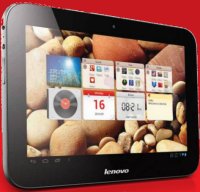 Lenovo just introduced a new line of tablets, including the 9-inch IdeaTab A2109A, which the company allowed Consumer World to borrow for review.